

Selecting the correct multiplier when estimating your daily energy needs can be challenging, especially when your daily movement and workout intensity vary from day to day. Looking closely at your training frequency, daily step counts, and total sitting time will help you select the most realistic multiplier. In this guide, you will learn how to choose an activity level in a TDEE calculator accurately and verify your numbers against real-world progress. Read on.
Quick Answer
- Evaluate Your Entire Day: Account for your overall lifestyle, including sitting time, job requirements, daily step counts, and structured workouts.
- Lightly vs. Moderately Active: Select lightly active for 1 to 3 light workouts with 5,000 to 7,500 daily steps. Choose moderately active for 3 to 5 hard workouts with 7,500 to 10,000 steps.
- Avoid Workout Overestimation: Do not choose a higher tier based solely on an intense 1-hour gym session if you spend the remaining 15 hours sitting.
- When in Doubt, Lean Lower: If you fall between two activity categories, select the lower option to prevent overestimating your daily baseline.
- Track Scale Trends: Audit your body weight trend over 3 to 4 weeks to confirm whether your chosen multiplier aligns with real-world fat loss.
What Does Activity Level Mean in a TDEE Calculator?
Your Total Daily Energy Expenditure (TDEE) represents the total energy your body burns over 24 hours. It combines your baseline metabolic needs with the energy used digesting food, performing daily tasks, and completing deliberate exercise.
According to nutritional standards established by the Academy of Nutrition and Dietetics, activity multipliers scale your Basal Metabolic Rate (BMR) to match your lifestyle demands. Selecting the correct tier ensures your baseline numbers accurately reflect your daily energy burn.
How to Choose an Activity Level in a TDEE Calculator
To help you choose an activity level in a TDEE calculator without guesswork, compare your daily habits and step counts against these standard categories:
1. Sedentary (Multiplier ~1.2)
Fits individuals working desk or remote jobs who engage in little to no structured exercise. Daily step counts are typically under 5,000 steps, with most waking hours spent sitting.
2. Lightly Active (Multiplier ~1.375)
Applies to individuals with desk jobs who perform 1 to 3 light workouts or regular walks each week. Daily step counts generally range between 5,000 and 7,500 steps.
3. Moderately Active (Multiplier ~1.55)
Suits those with desk jobs who complete 3 to 5 structured workouts (45–60 minutes each) weekly while averaging 7,500 to 10,000 steps. It also fits active jobs like teaching or retail with moderate exercise.
4. Very Active (Multiplier ~1.725)
Describes individuals engaging in intense training 6 to 7 days a week or working physically demanding jobs combined with daily exercise. Step counts frequently exceed 12,000 daily steps.
5. Extra Active (Multiplier ~1.9)
Reserved for heavy manual labor professions such as construction or agriculture combined with intense daily workouts, or competitive athletes logging over 15,000 steps daily.

Common Mistakes When Choosing an Activity Level
Selecting an incorrect activity factor is one of the primary reasons people fail to see predictable progress. Watch out for these common missteps:
- Focusing Only on Workouts: An intense 60-minute weight lifting session burns calories, but remaining sedentary for the other 23 hours keeps your overall daily burn relatively low.
- Overestimating Calorie Burn: Research indicates that individuals frequently overreport physical exertion. Judging daily energy burn by how tired you feel can lead to overestimating energy needs.
- Changing Categories Too Quickly: Switching activity levels after just a few days of varied movement creates unstable calorie targets. Base adjustments on consistent multi-week data.
For more context on setting up your overall energy goals, read our detailed guide on how to calculate calorie deficit for fat loss to ensure your nutritional targets match your activity level.

How to Check if Your Chosen Activity Level Is Accurate
TDEE calculators provide estimates, not exact figures. Once you choose an activity level in a TDEE calculator, validate your multiplier using real-world tracking:
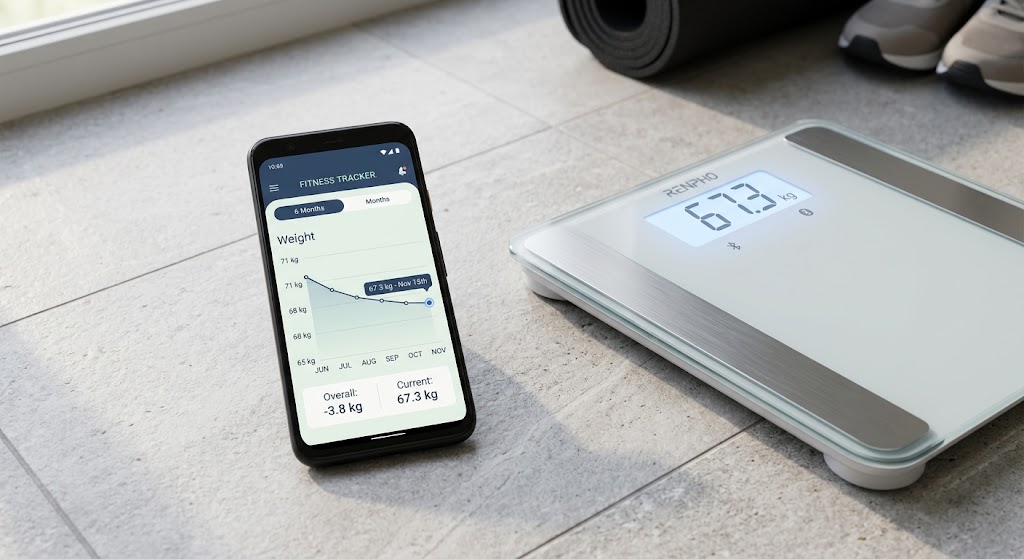
- Monitor 7-Day Scale Averages: Evaluate weekly weight trends rather than daily fluctuations to determine whether you are maintaining, losing, or gaining weight.
- Compare Results to Goals: If your goal is fat loss and your scale weight remains completely flat over 3 to 4 weeks, your selected activity tier is likely too high.
- Adjust Incrementally: Make small adjustments of 100 to 200 calories rather than drastic activity shifts when fine-tuning your baseline.
Should You Choose a Higher Activity Level to Increase Calories?
Selecting a higher activity tier simply to raise your daily calorie allowance often backfires. Jumping up a tier can artificially inflate your estimated TDEE by 300 to 500 calories, inadvertently wiping out your energy deficit.
If you are unsure how to choose an activity level in a TDEE calculator, always start with the more conservative lower tier. If you consistently lose weight faster than planned, you can easily add calories back into your daily target.
Complementing your daily movement with structured routines can also stabilize your baseline burn. Explore our beginner weight training routines to build lean muscle mass and support your metabolism.
Common Routine Errors That Impact TDEE Accuracy
- Inconsistent Weekend Movement: Staying highly active on weekdays but sitting continuously on weekends lowers your true weekly average activity level.
- Ignoring Proper Sleep: Sleeping less than 6 hours a night causes fatigue, subconsciously reducing your non-exercise movement throughout the day.
- Skimping on Daily Protein: Inadequate protein intake during weight loss can lead to muscle loss, which slowly lowers your resting metabolic burn over time. Consider incorporating high-protein meal options to protect lean tissue.
Frequently Asked Questions
1. What activity level should I choose if I exercise three times a week?
Three workouts a week typically fall between lightly active and moderately active. If your workouts are short and daily steps are under 7,500, select lightly active. If your workouts are intense and steps exceed 7,500, choose moderately active.
2. Should daily walking count when I choose an activity level in a TDEE calculator?
Yes. Non-exercise walking forms a major part of your overall energy expenditure. Your daily step count is often a more reliable indicator of activity level than workout frequency alone.
3. What activity level should I use if I have a desk job but work out regularly?
Evaluate your entire day combined. A desk job with 3 to 5 workouts and 7,500+ daily steps usually aligns with moderately active. If daily steps outside the gym are low, lightly active is the safer choice.
4. Can I change my activity level after calculating my TDEE?
Yes. Your initial calculation is only a starting estimate. Adjust your activity level or daily calorie targets based on your actual weight changes over 3 to 4 weeks.
5. How accurate are TDEE activity level calculators?
TDEE calculators offer useful starting points with reasonable accuracy for most people. However, tracking body weight trends over time remains the gold standard for finding your true energy requirements.